



NetSetMan 5.4.0
(⇒ What's new?)Are you tired of manually changing your location-based network
and system settings on your laptop computer over and over again?
Then NetSetMan is your solution. It will do the work for you.
Switch between configuration profiles for different locations instantly!

 Read the
  Like NetSetMan on
  Subscribe to the
  Download NetSetMan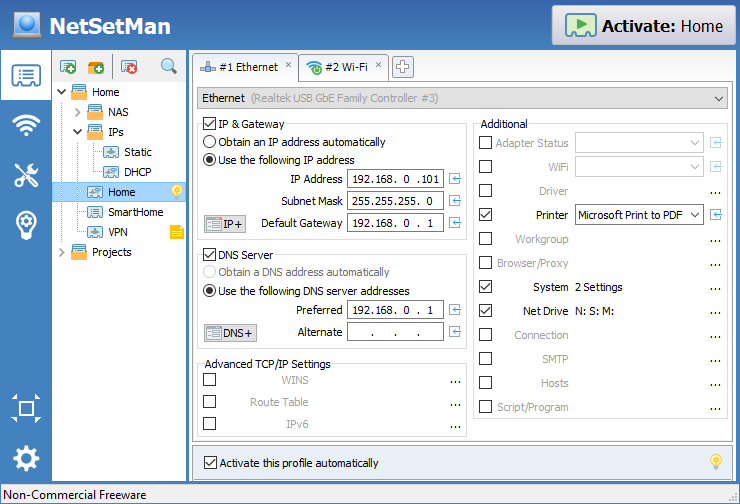
Features
NetSetMan is a network settings management software that lets you easily switch between your preconfigured profiles!
| Feature-List | NC-Free | Pro |
| Settings | ||
| IP Addresses IP, Gateway, DNS, WINS - Multiple IPs per NIC - IPv4 & IPv6! |
||
| Workgroup Change your workgroup on the fly! |
||
| Default Printer Your print jobs will always go to the right printer |
||
| Network Drives Map and disconnect network locations as local drives |
||
| DNS Suffix Full configuration options, as you know them from Windows |
||
| Route Table Add, delete or change the entries in your local IP routing table |
||
| SMTP Server Dynamically change the outgoing server of your email client |
||
| Hosts File Entries Map hostnames to IP addresses |
||
| System Settings Display Mode, Screensaver, Wallpaper & Color, Power Plan, Design & Sound Scheme, Speakers & Microphone Volume, Time Zone, Windows Firewall, Windows Update |
||
| Computer Name Different computer names for different locations |
||
| MAC Address Expert setting: Only change the hardware address of a NIC if you really know what you're doing! |
||
| NIC Status Activate, deactivate or restart your network adapter |
||
| Protocol Bindings Enable/disable NIC protocols like IPv6, File & Printer Sharing, etc. |
||
| LAN Settings (Speed/Duplex, MTU, VLAN, …) Speed/Duplex, MTU (Jumbo Packet), Flow Control, VLAN ID These settings are driver-specific and are available for compatible NICs |
||
| Connections (RAS/DUN/PPP/VPN) Connect to and disconnect from stored connections |
||
| Scripts (BAT, VS, JS, …) Extend the functionality to fit your custom needs! (UAC: restricted or elevated without prompt) |
||
| Program Execution Start/stop, UAC (restricted or elevated without prompt), maximized/minimized ⇒ Details |
||
| Proxy
Individual configurations for all available browsers + Browser Home Page [Example]:
 Windows/Internet Explorer (IE): Full support Windows/Internet Explorer (IE): Full support Firefox: Full support (incl. profiles) Firefox: Full support (incl. profiles) Opera (<= v12): Full support (incl. profiles) Opera (>= v15): Doesn't support own proxy settings; uses IE settings Opera (<= v12): Full support (incl. profiles) Opera (>= v15): Doesn't support own proxy settings; uses IE settings Chrome: Doesn't support own proxy settings; uses IE settings Chrome: Doesn't support own proxy settings; uses IE settings |
||
| Network Domain Join/leave network domains without reentering your credentials |
||
| General | ||
| WiFi Management New! Organize, create, delete and connect to WiFi/WLAN profiles |
||
| AutoSwitch Automatically activate profiles based on conditions: Surrounding WiFi networks, Network Location Awareness, Gateway MAC, Ping, NIC status, Time frame |
||
| Tray-Info for all current IP settings Quickly check all your IP settings without a single click! |
||
| Tray-Menu for quickly switching profiles Activate a profile with one click from the tray icon! |
||
| NetSetMan Service for usage without admin privileges Allows using NetSetMan with limited user accounts |
||
| Pre-Logon profile switching Switch settings even before logging on! [Example] (Compatible settings: IPs, WiFi, NIC status, workgroup & domain, display resolution, PC name, firewall, SMTP, hosts, scripts) |
||
| Administration for defining permissions Password-protection for deciding what a default user is allowed to do |
||
| Command line activation Parameters to activate profiles by command line and shortcuts |
||
| Tools: Network Scanner, Connections, Console, ... Fully integrated network tools that make NetSetMan an all-in-one solution (e.g. Network Scanner) |
||
| Quick access to frequently used Windows locations With one click to Internet Options, Control Panel, etc. |
||
| Commercial Use / Can be used at work The Freeware version is for non-commercial use only! Thank you for respecting the license agreement. (⇒ Further details) |
||
| Use in a network domain It is unfortunately necessary to take technical measures to prevent unauthorised commercial use. By definition, a network domain is a professional network that is used almost exclusively for commercial purposes. The software can then only be used for 14 days for test purposes. (⇒ Further details) |
||
| Use with Windows Enterprise/Server The Enterprise Edition of Windows is targeted at larger companies and is not officially sold to private customers. The software can then only be used for 14 days for test purposes. (⇒ Further details) |
||
| Profiles Pro: Unlimited amount of profiles and profile groups |
8 | Unlimited |
| Price | Free | 25-49€ |
| Languages | |
 |
Bulgarian |
 |
Chinese (Simpl.) |
 |
Chinese (Trad.) |
 |
Croatian |
 |
Czech |
 |
Dutch |
 |
English |
 |
French |
 |
German |
 |
Hungarian |
 |
Italian |
 |
Japanese |
 |
Korean |
 |
Polish |
 |
Portuguese |
 |
Russian |
 |
Serbian |
 |
Slovenian |
 |
Spanish |


NetSetMan offers what you've been missing in Windows until now: A powerful, easy-to-use interface to manage all your network settings at a glance. Give it a try and you'll never want to be without it again.
Download
3in1: Setup, Update & Portable in one file!
License: Non-Commercial Freeware
Release date: 2025-03-05
Language: Multilingual
For Windows: 7/8/10/11 (32/64 Bit)
Updating from version 4.x?
License
NetSetMan is Freeware for non-commercial use.
You may use NetSetMan for free as long as you don't save paid working time. Any commercial use (at work, company notebook, etc.) requires a NetSetMan Pro license.
For detailed information please refer to the NetSetMan Software License Agreement
